
Guide Me on Apple Watch
Apple Watch
On your phone? Guide Me
Guide Me points you to a waypoint or any spot on the map, showing how far away it is and which direction to go.
How to guide to a waypoint
-
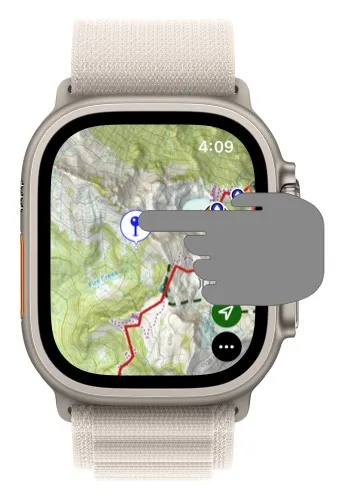
Tap the waypoint on the map.
-
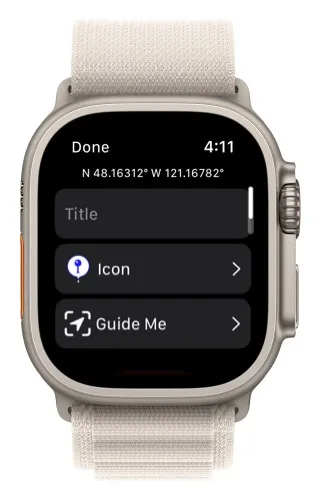
Tap Guide Me.
-
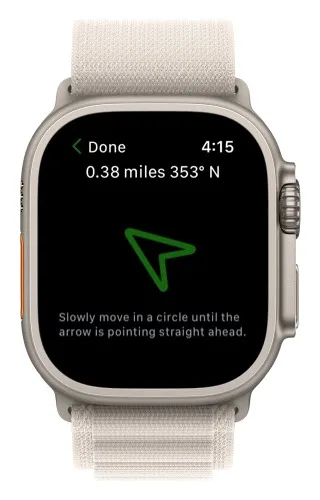
Guide Me opens. The top shows how far away the waypoint is.
-
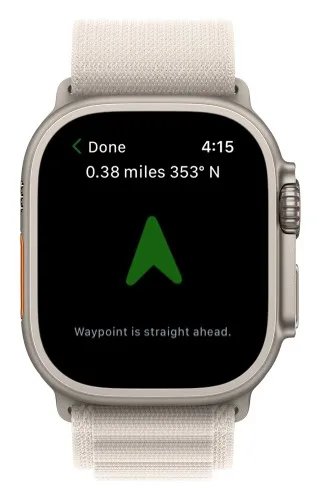
Hold your wrist flat and slowly turn in a circle until the arrow points straight up. The waypoint is then straight ahead.
How to guide to any point on the map
-
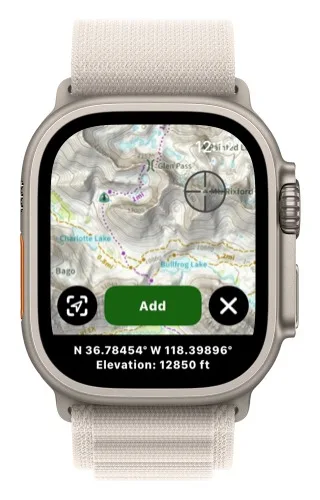
Tap and hold on the map.
-
Move the crosshairs to the spot you want to go to.
-
Tap the Guide Me button in the bottom-left corner.
The Guide Me button only appears if your Apple Watch has a compass.
Updated October 7, 2026
More in Apple Watch
Still need help?
We’re a small team and we read every message. Email support@topomaps.co and tell us which device you’re on.