
Intro to the App
Using the web app? Intro to the Web App
Welcome to Topo Maps+! This tour walks through the buttons on the main map screen so you know where everything lives. If you haven't downloaded the app yet, get it on the App Store.
The main screen
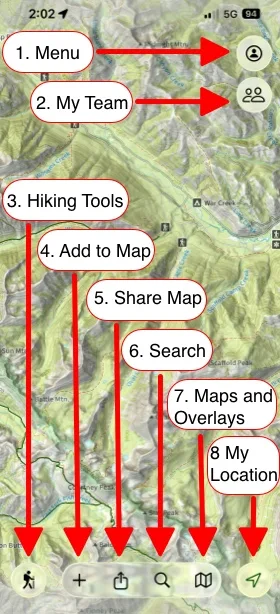
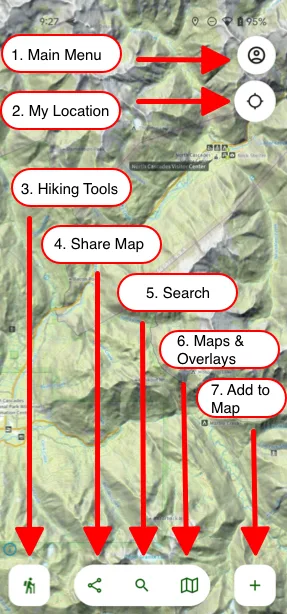
- Menu (top-right corner): open your saved Routes, Tracks, Waypoints, Regions, Folders, and Teams, plus Settings and the Help Center.
-
My Team (below Menu): share your location with your team members.
- Hiking Tools (bottom-left corner): trail tools at your fingertips, like recording a track.
- Add to Map (the + button, bottom-right corner): create Waypoints, Routes, and Regions, or import maps.
- Share: send, export, or print your data.
- Search: find trails, parks, mountains, or your own data.
- Maps and Overlays (the folded-map button): change your map and turn overlays on or off. See Map Activity Style and Map Overlays.
- My Location (bottom-right cornerbelow Menu, top-right):
- Tap once to center the map on your location.
- Tap twice to rotate the map with your compass.
- Tap three times to hide your location dot.
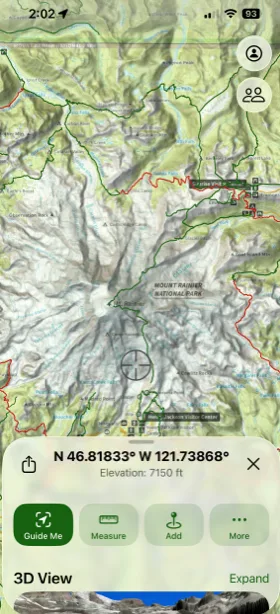
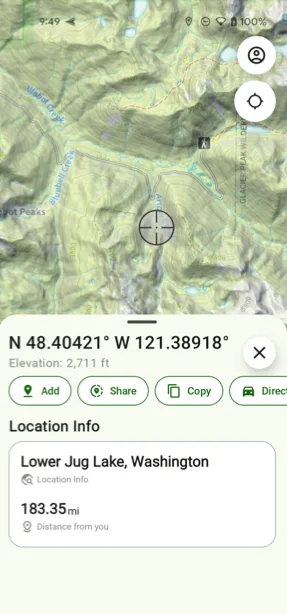
Long press anywhere on the map
Press and hold any spot on the map to open a quick menu for that point. From there you can add a waypoint, share the location, use Line of Sight or Guide Me, and see the spot's coordinates and elevation.
Plan on a bigger screen
Your phone is always in your pocket, and its GPS works even without cell service, which makes it the best device for the trail. If you'd rather plan on a bigger screen, use the iPad or Mac app, or the web app at home, then sync your account to bring everything to your phone.
Updated October 7, 2026
More in Getting Started
Still need help?
We’re a small team and we read every message. Email support@topomaps.co and tell us which device you’re on.