
Intro to the iPad App
iPhone & iPad
Topo Maps+ for iPad gives you a bigger screen than a phone with the same touch controls, which makes it a good choice for planning if you don't have a Mac. Haven't downloaded the app yet?
The main screen
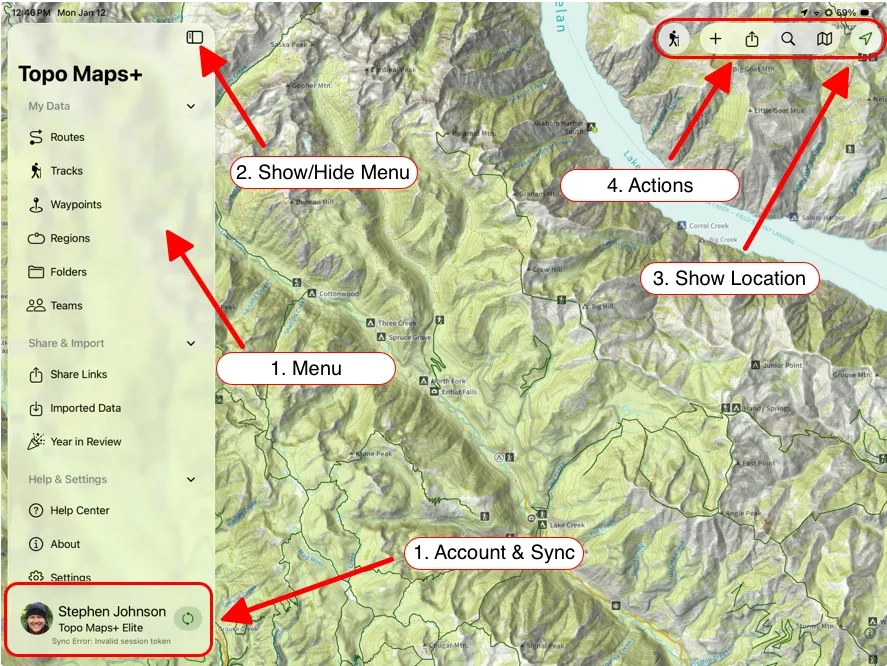
- Menu: view your saved Routes, Tracks, Waypoints, Regions, Folders, and any Teams you're part of. You can also open the Help Center and change your settings from here.
- Show/Hide Menu: tap to show or hide the menu for a full-screen map.
- Show Location:
- Tap once to center on your location.
- Tap again to orient the map with the compass.
- Tap a third time to hide your location dot.
- Actions along the top of the map:
- Account & Sync (bottom of the menu): tap to view your account information. Tap the circular arrows to sync your data.
Updated October 7, 2026
More in Getting Started
Still need help?
We’re a small team and we read every message. Email support@topomaps.co and tell us which device you’re on.